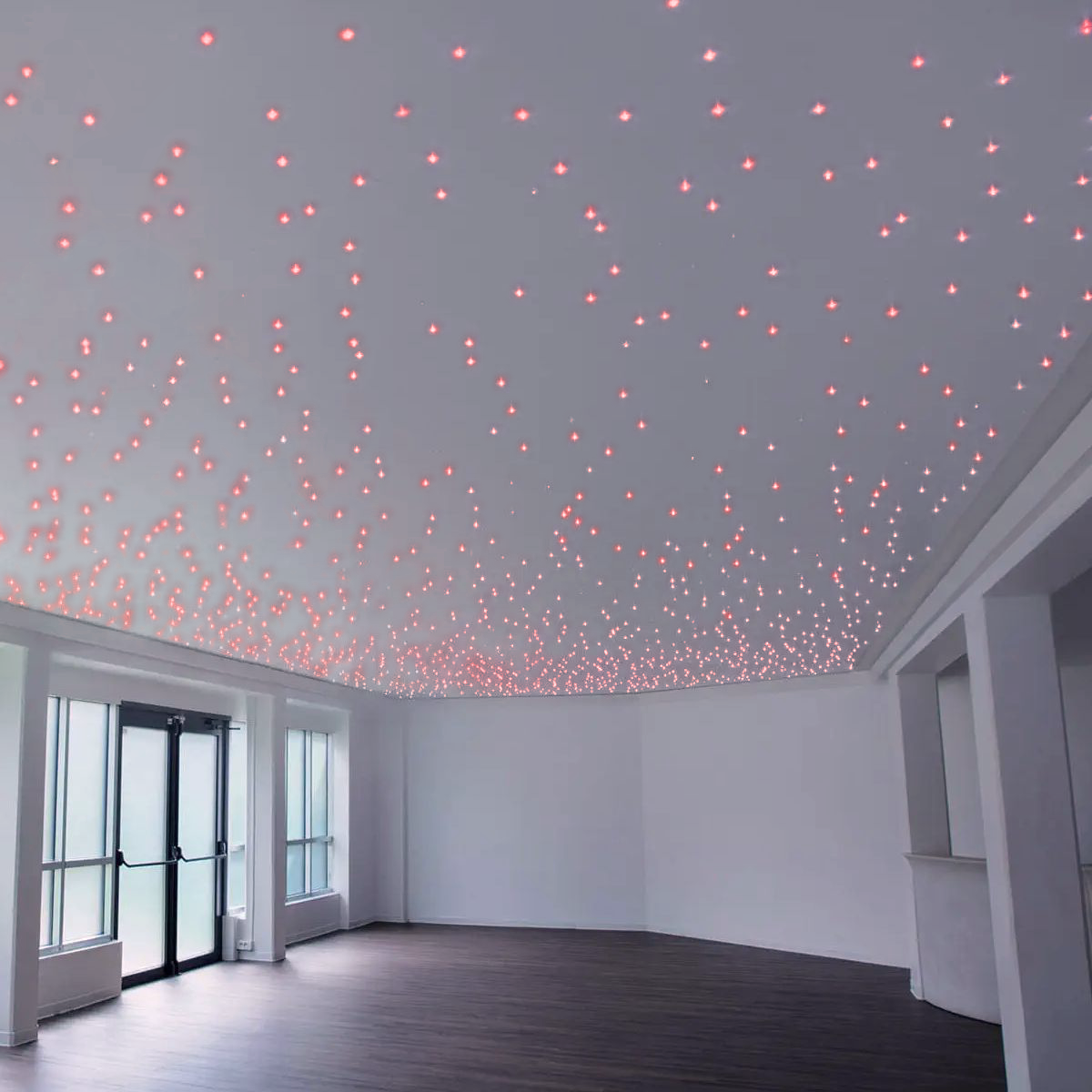


























The LED starry sky dimmer is the component that turns a ceiling of light points into a real starry night: without it, the spotlights would always stay on at full brightness. The choice comes down to one question: do you want to adjust the stars from a wall push-button or also via app and voice? There are two dimmers in the catalog, one for each answer. The smart one is the most popular among our starry sky customers.
(If you are still designing the system, start with the complete guide on how to build a LED starry sky)
Why you really need a dimmer (it’s not optional)
A starry sky at full power shines brighter than you might think. Each spotlight emits 28 lumens with a narrow 15° beam: with the density we recommend, about 6 light points per m², about 120 lux reaches the floor. That is the light of a normal illuminated living room, not a starry night.
The sky effect is created when the stars are dim enough to make the room disappear, leaving only the points. To achieve this, you need a dimmer that can go very low: the push-button version adjusts from 2.5% to 100%.
(To calculate how many spotlights you need: guide to calculating light points)
Where to connect the dimmer
The dimmer works on the 12V side, between the power supply and the spotlights, never on the home 230V mains:
230V mains → 12V stabilized power supply → dimmer (input) → dimmer (output) → ribbon cable → spotlights in parallel
Both models have the same shape and connection: both are controlled by a standard push-button from your electrical series, connected directly to the dimmer terminals. The smart version adds Wi-Fi for apps and voice assistants. You need a push-button, not a switch: the dimmer distinguishes between a short click and a long press.
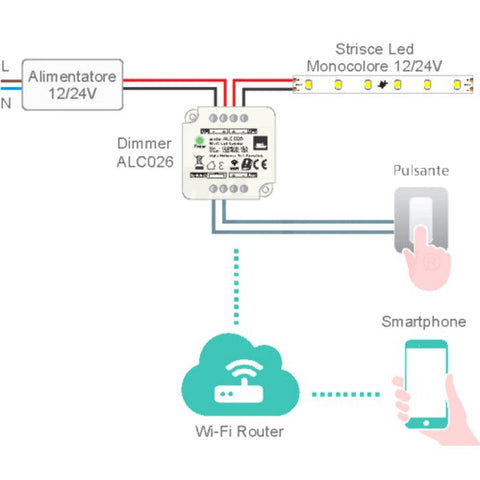
Connection diagram: the dimmer goes between the power supply and the spotlights, on the 12V side.
Both dimmers fit into a 503-style junction box (48.8 × 48.8 × 24 mm): they are mounted in place of a standard modular component, without any visible extra boxes.
Push-button or smart? The choice in a table
| Your situation | Right dimmer | Why |
|---|---|---|
| You only want to adjust the stars from a wall push-button | 503 push-button dimmer | Short click to turn on/off, long press to adjust. No app. |
| You have Alexa or Google Home | Smart Wi-Fi dimmer | "Alexa, dim the stars" actually works. |
| Bedroom: you want it to turn off by itself | Smart Wi-Fi dimmer | Sleep timer programmable via the Smart Life app. |
| Wi-Fi signal is weak at the installation point | 503 push-button dimmer | No network dependency. |
| You want both options | Smart Wi-Fi dimmer | App, voice, and wall push-button: the button works even if the Wi-Fi goes down. |
Ready-made carts: kit + dimmer + wiring in one click
- Room up to 10 m², smart: 50 pc kit 3000K + smart dimmer + accessory kit → add all to cart
- Room up to 10 m², push-button: 50 pc kit 3000K + 503 dimmer + accessory kit → add all to cart
- Master bedroom 10–18 m², smart: 100 pc kit cold + blue + smart dimmer + 2 accessory kits → add all to cart
In the 50-piece carts, the color temperature is 3000K. For other temperatures, choose the 50 pc kit from the product page and add the dimmer separately.
Is one dimmer enough? The math
Yes, for all kits in the catalog. Both dimmers support 10 A, i.e., 120 W at 12V, and each spotlight consumes 0.3 W:
| Spotlights | Power | Current | Dimmer load |
|---|---|---|---|
| 50 | 15 W | 1.25 A | 12% |
| 100 | 30 W | 2.5 A | 25% |
| 150 | 45 W | 3.75 A | 37% |
The real limiting factor is the power supply, not the dimmer: size it with at least a 20% margin on the load.
Scenes that work, room by room
Bedroom. Low brightness, around 20–30%, to help you fall asleep without a bright light keeping you awake. With the push-button dimmer, from off, a long press activates night-light mode at 2.5–10%: it is the perfect nighttime intensity.
Kids' room. The smart version wins here: you can program automatic shut-off after 30–45 minutes via the app, so you don't have to tiptoe in to turn it off. After a blackout, the smart dimmer remembers the intensity and on/off status, so you won't find the stars at full brightness at 3 AM.
Home cinema and living room. Scenes via app or voice: stars at minimum during the movie, at 50% during intermissions. With Alexa or Google Home, just ask.
Errors to avoid
- Using a 230V wall dimmer you already have at home. Phase-cut dimmers are meant for 230V lamps: placed before the power supply, they will not regulate a 12V system correctly and may damage the power supply. You need a 12V LED dimmer on the low-voltage side.
- Using a switch instead of a push-button. The dimmer needs an impulse command: a switch stays closed, and the dimmer won't know what to do.
- Configuring the smart dimmer on a 5 GHz network. The dimmer only connects to 2.4 GHz Wi-Fi. If your router combines both bands under one name, pairing will fail: separate the bands during configuration.
- Unstabilized power supply. The dimmer will not correct this: above 12.5 VDC, the spotlights will burn out, with or without a dimmer.
A note from Oniroview support: the calls we receive about dimmers almost always come before the purchase to clarify a detail. We have had zero reported issues after installation. If you have a doubt, call us first: it’s the best way forward.
Frequently Asked Questions
Are all starry sky spotlights dimmable?
Yes. Our kit spotlights operate at 12V with an integrated resistor and are regulated by a 12V LED dimmer placed between the power supply and the spotlight line. No additional components are needed on the individual light points: the dimmer regulates the entire system at once, keeping the brightness of all stars uniform.
Can I use the lamp dimmer I already have at home?
No. Dimmer switches for 230V lamps use phase-cut technology on the mains and are not designed to regulate a 12V DC system. Placed before the power supply, they do not regulate correctly and risk damaging it. For a starry sky, you need a 12V LED dimmer, connected on the low-voltage side, between the power supply and the spotlights.
Is one dimmer enough for 150 spotlights?
Yes, with plenty of headroom. Our dimmers handle 10 A, which is 120 W at 12V, while 150 spotlights consume 45 W, only 37% of the capacity. The component to size carefully is the power supply: for 150 spotlights, you need at least a 60 W stabilized 12V power supply.
Does the smart dimmer work if the Wi-Fi goes down?
Yes. The wall push-button connected to the dimmer remains operational even without a network: you only lose app and voice control until the Wi-Fi returns. After a power outage, the dimmer remembers the intensity and its on/off state, so the system starts up exactly as you left it.
Why won't the smart dimmer connect to Wi-Fi?
It is almost always the band: the dimmer only works on 2.4 GHz networks. Many modern routers combine 2.4 and 5 GHz under the same name, and pairing via the Smart Life app will fail. Simply separate the two bands temporarily in the router's panel during configuration, then you can reunite them.
Can I control it with a push-button from my current electrical series?
Yes, both models are controlled by a standard push-button from your series, connected directly to the dimmer terminals. It must be a push-button, not a switch: the dimmer distinguishes between a short click, which turns it on/off, and a long press, which adjusts the intensity.
Choose your spotlights in our selection of LED starry sky kits and complete your system with the right dimmer from the LED dimmer category.